If you’re reading this, it means you’ve received your retouched boudoir images. I hope you fall in love with your gallery again and again now that you can see them for yourself!
Before you take a look at your gallery, here are some reminders and information that I have for you:
Your Online Gallery
- Please note the expiration date of your gallery. Your password is the expiration date!
- Please download your images early and often. Because I don’t keep client galleries online for longer than is necessary out of an abundance of caution for the security of your images, please don’t hesitate to download your images. Your gallery will expire and go offline on the expiration date. Please download your images before this date.
- Click “download all” in the top right corner of the main gallery page to download your images. This should prompt you to send a zip file to your email. You can also download the images one-by-one to your phone or tablet. Google Photos is also integrated into my gallery hosting system should you want to store your images there. The easiest way to get them all at once is to click “download all” and save them to your computer.
- Back up your images in multiple places. I recommend keeping your images on your computer, your tablet, your phone, on an external hard drive or flash drive, and/or in the cloud. Back them up in as many places as you can!
- Again, please download your images. 🙂 You’d be surprised at how often I have to email clients to get their photos downloaded. Please, from the bottom of my heart, don’t make me chase you down to get your photos downloaded!
Your Digital Images
- Remember that everyone has skin texture. The only people who have naturally smooth skin are babies!
- Resist the urge to zoom in. I recommend zooming in ever-so-slightly so that you can let me know if I missed any temporary blemishes, but please don’t zoom until all you see is blurry pixels. 🙂
- Similarly, avoid adjusting your brightness too much. When viewing your photos, try to stay as middle-ground as you can in regards to the brightness of your screen. Sometimes I brush shadows on in Photoshop to hide my ugly ass baseboards, and that can look a little funky when the brightness is jacked all the way up.
- A reminder about light and shadows. Light does not discriminate. It is not created equally, and as such, it can cast interesting shadows on your body. Sometimes this means your skin tone may be different from one part of your body to another. This can also be due to things like tans of any kind or simply because it is very rare that our bodies are all the same shade or tone. Please know that I’ve matched your skin tone across your body to the best of my abilities!
- A reminder about flyaway hairs. I totally get it — Denver is dry af. I have removed as many stray hairs as I could in your final photos. This means I often have to remove the hair and then recreate the image underneath it, which is more graphic design/creative editing than it is retouching — and generally not my area of expertise in Photoshop. Please know that I’ve removed any split ends, frizzy hairs, or damaged hairs to the best of my abilities!
- A note on skin smoothing over things like tattoos and fishnets. In order to not smooth these items to the point where they look uncanny, I tend to avoid skin smoothing these areas too much. If you’d like more skin smoothing in these areas (should it apply to your photos), please let me know and I’ll be happy to go back in. Just know that the tattoos or fishnets might appear softer and less prominent in the final photos.
- Magazine level retouching may be the best option for removing indentation lines left by garments. Sometimes, the best option to removing indentation lines (especially those on your booty and hamstrings) may be the magazine level smoothing style. Indentation lines can be tricky to remove. Please know that if I chose this option for your indentation line removal that it was the best and last exhausted option for skin smoothing in those areas.
Retouching
- Please let me know if I missed anything. Sometimes I can’t tell the difference between a beauty mark and a blemish. Especially in black + white! Sometimes blemishes can look like normal, regular skin texture. You know your body and skin better than I do! Please let me know if I missed anything and I’ll be more than happy to remove it.
- Let me know if you’d like more skin smoothing. I can add on skin smoothing anywhere you’d like! It’s just like putting on foundation in real life, only digitally. If you’d like more skin smoothing in a certain area, let me know and I’ll be happy to adjust for you.
- Point out any stray threads that can be removed. Sometimes lingerie can have little excess threads hanging off the ends of your outfits. If I missed any, please let me know and I can take care of that before we print. As a reminder, this is the only part of your wardrobe that I’ll adjust in Photoshop. I’m unable to adjust any ill-fitting items in Photoshop. That’s why I do my absolute best to catch these things while we’re shooting! Sometimes fabric will lay a certain way on your body and that’s not necessarily something that needs to be fixed. Boudoir is not meant to be 100% perfect!
- Please refer back to the main retouching guide here if you need a refresher on what kinds of things are included in your retouching.
- In an email, let me know what I’ve missed and what you’d like to change. To do so, please send me an email with what changes you’d like to see. Each image in the gallery has its filename located above it, ending in .jpg. Please include the filename to let me know which image(s) you’re referencing.
- Please remember that retouching requests only cover things you’d like to adjust on your skin. As a reminder, I don’t change the shadows or light of the image. I can’t adjust the natural blur of something in the background of the photo, for example, or change the shape of your body or your clothing. This is real life, baby! 🙂
Locating the filename to send me for retouching requests:
In the screenshot below of a client’s gallery taken from my laptop, you can see the filename that I’ll need in the top right corner: S-2.jpg. Your filename will be your first initial, followed by a dash, and then the number of the image in your gallery.

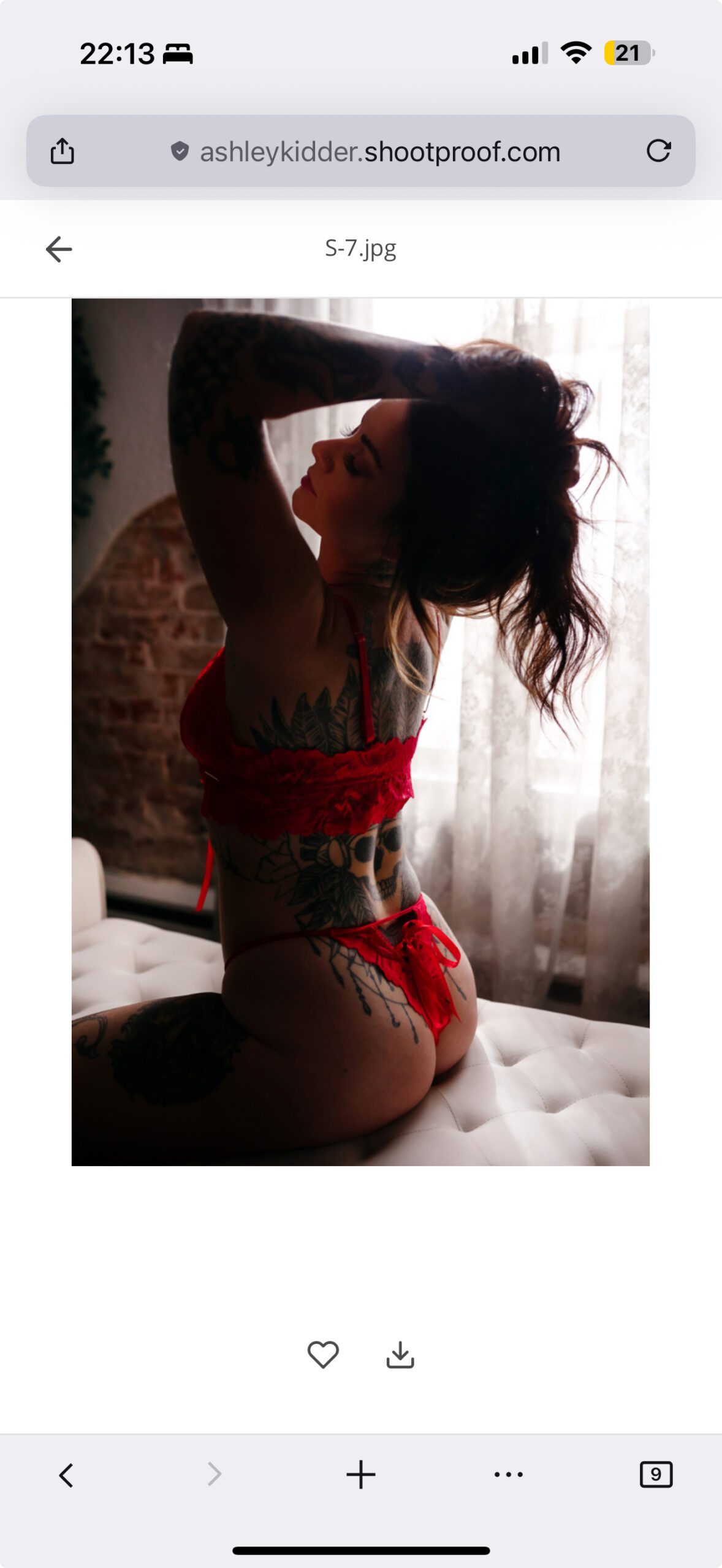
If you are on mobile, like in the screenshot below, the filename you’ll want to send me for retouching requests will be top center, directly above the image. The filename of this image is S-7.jpg.
Finalizing Your Images
- Once you like how your skin looks, we’ll go to print! Make sure to send me an email giving me permission to print your products. I can’t print anything without the go-ahead from you, so let me know whenever you’re ready and I’ll fire it off!
- If you purchased a package with me (like the Beauty Collection or Luxe Collection), I’ll be getting the remaining digital images in your package ready next. I always get your album images retouched first so that we can send this beauty off to the printer ASAP! I’ll need a little more time to retouch the digital images that come with your package. I’ll send you an email to let you know when those will be ready.
As always, send me any questions. Talk soon!
x Ash